Expense IQ Money Manager
- 3.2
- Rating
- 1.00M
- Installs
- Free
- Price

 Analysis by App-foxy
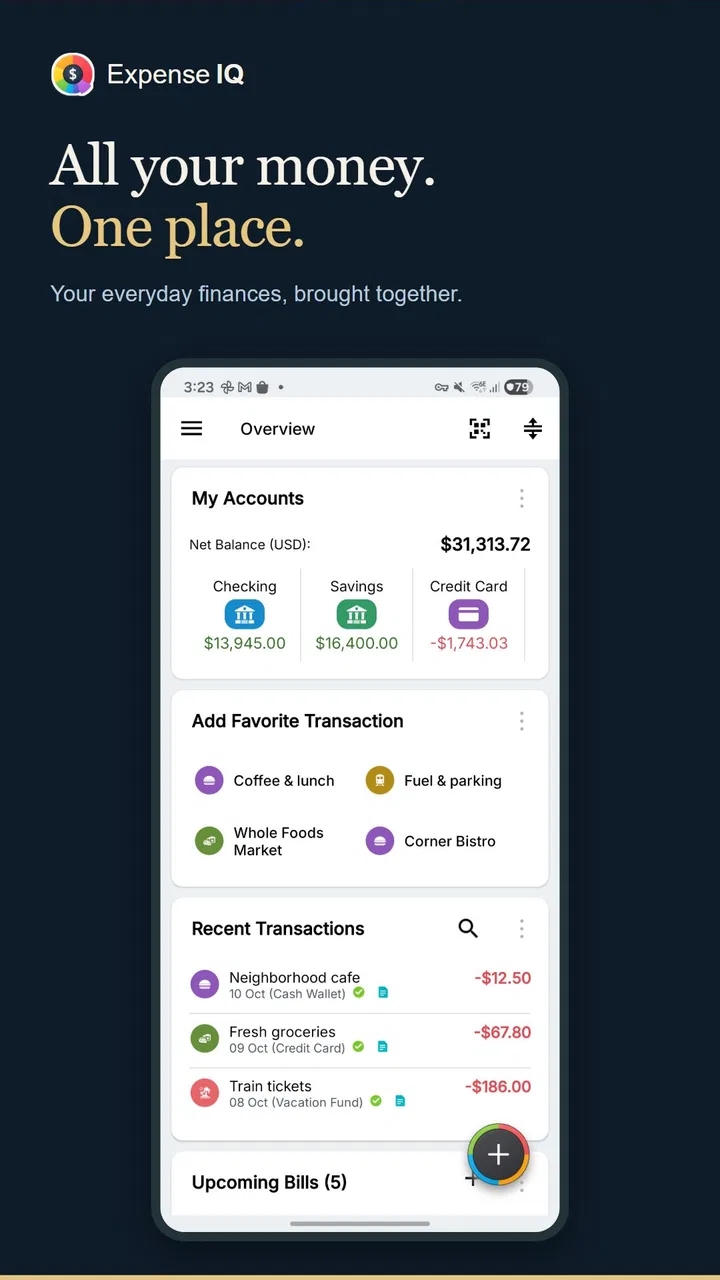
Managing money usually becomes difficult at the exact moment I am too busy to think about it. A receipt stays in my pocket, a bill gets buried in an email, and a small purchase that seemed harmless becomes part of a surprisingly expensive week. Expense IQ Money Manager is designed for that everyday problem. It is a free finance app from Handy Apps that brings spending records, budgets and bill reminders into one place instead of leaving them scattered across notes, banking apps and memory.
My first impression is that it works best as a hands-on money journal rather than a completely automatic financial assistant. That distinction matters. If you want to actively record purchases, review patterns and give upcoming bills a visible place, it can become a practical routine. If you expect every transaction to appear without any effort, the experience may feel less convenient than a bank app with automatic categorization. I found its value in the complete workflow: entering a payment, assigning meaning to it, checking the effect on a budget and using that information to make the next decision.
From an untracked purchase to a clearer monthly plan
I’ll trace how Expense IQ turns a forgotten purchase into information for a monthly budget, then focus on the practical choices that make the routine easier to maintain. A useful starting point is to decide which expenses deserve immediate attention and which can wait for a weekly review; that keeps tracking manageable without losing sight of the plan.
You May Also Like

 Blood Strike: 2.5 Anniversary
Blood Strike’s Loadouts Turn Every Drop Into a Tactical Gamble
A close look at Blood Strike’s custom loadouts: how fast access to signature weapons reshapes its battle royale rhythm, rewards preparation, and narrows the gap between fights.

 Pandora - Music & Podcasts
Pandora’s Music Is Easy to Start, but Harder to Recover
Pandora’s strength is its low-effort path from a seed to a station. Its weak spot is how much confidence it asks you to place in connection, setup, and quiet recovery.

 8 Ball Pool
 Is Built on Rivalries, Rematches, and Routine
A close look at the rivalries, rematches, shared routines, and unanswered safety questions that turn a quick pool match into a persistent mobile community.

 Samsung Music
’s Quiet Strength Is Playing What You Already Own
Its reach comes less from spectacle than from dependable access to a personal library. That simplicity is both the app’s strongest retention engine and its ceiling.

 AccuWeather: Weather Radar
AccuWeather Review: A Quick, Clear Forecast for Everyday Decisions
For everyday plans, the best forecast is the one you can understand quickly. AccuWeather makes rain timing, radar, and local conditions easy to act on, with a few trade-offs.

 Hill Climb Racing
Why Hill Climb Racing Still Turns Crashes Into One More Run
A tiny car, a bumpy hill and one more upgrade: Hill Climb Racing keeps resurfacing because its simple chaos makes every near-miss feel personal.
More From Our News Desk



Starting with the real money problem
Imagine a normal weekday. I buy lunch, pay for transport, pick up a few household items and remember that a subscription is due later in the week. None of these costs is dramatic by itself, but together they make my balance harder to understand. The usual alternatives each solve only part of the problem. A bank application is useful for checking an account, a spreadsheet offers flexibility, and a notes app is quick for rough lists. None of them necessarily turns a collection of small entries into a focused spending routine.
This is where Expense IQ Money Manager makes sense. I can treat it as the place where a financial event becomes a usable record. The important step is not merely writing down “lunch” or “shopping.” It is deciding which part of my plan that purchase belongs to, whether it was expected, and how it changes the rest of the month. That extra context is what makes the app more useful than a simple list.
The app is rated for Everyone, which fits its practical, household-oriented purpose. It is also an older Android application, released on May 14, 2014, and its current version is 2.3.2 with Android compatibility beginning at version 4.4. That broad device support may appeal to people using an older phone, although the age of the software is also something I would keep in mind when comparing it with newer finance tools.
Step one: record the transaction while it is still fresh
The most reliable workflow begins immediately after spending. I open the app, enter the amount and describe what the money was for. Doing this at the point of purchase avoids the common end-of-week problem where several transactions have blurred together. I may remember the total, but not whether it belonged to groceries, eating out, transport or an unplanned purchase. A short entry made at the right time is usually more useful than a detailed reconstruction later.
I would not try to log every tiny payment with the same level of detail. That creates too much friction and makes the habit difficult to maintain. For regular expenses, I use consistent categories and simple descriptions. For an unusual purchase, I add enough detail to recognize it later. This balance is one of the less obvious keys to using the app well: the best record is not the longest one, but the one I will actually keep making.
For someone sharing household finances, this step also creates a useful handoff. One person can enter a payment made with cash while another later reviews the household picture. That does not replace communication, and I would still confirm important figures against the relevant account or receipt, but it gives both people a common place to discuss spending instead of relying on memory.
Step two: turn entries into a budget conversation
Once several transactions are recorded, the budget planner becomes more meaningful. I can compare what has already happened with the amount I intended to spend in a category. The useful question is not simply whether I am “over budget.” It is why. A higher grocery total might reflect a one-off household purchase, while repeated restaurant spending may point to a habit that needs attention.
I prefer reviewing the budget after a few days rather than waiting until the end of the month. Early review leaves room to adjust. If discretionary spending is already moving quickly, I can choose cheaper meals, postpone a nonessential purchase or protect money needed for a bill. The app cannot make that choice for me, but it makes the trade-off easier to see because the individual entries and the broader plan are connected.
A practical technique is to create a budget that reflects decisions I can control, rather than filling it with categories that look precise but are hard to maintain. Fixed obligations deserve their own attention, while flexible spending can be grouped sensibly. If I divide every purchase into too many narrow labels, the budget becomes a data-entry exercise. Expense IQ is more useful when its categories help me decide what to do next.
Step three: use bill reminders before the deadline becomes urgent
The bills reminder is valuable for a different reason from expense tracking. A completed payment tells me where money went; a reminder helps me prepare for money that will leave soon. I use the two ideas together. After recording a recurring obligation, I can look at the upcoming schedule and avoid treating the current balance as entirely available.
This is especially helpful around a pay cycle. A balance may look comfortable immediately after income arrives, but several known commitments can reduce it quickly. Seeing those obligations alongside ordinary spending encourages a more realistic plan. I would still keep official statements and payment confirmations as the final authority, but the reminder gives me a planning layer that a basic transaction history may not provide.
The handoff here is between planning and action. The app can remind me that a bill is approaching, but I still need to pay it through the appropriate provider or banking service. Afterward, I record the payment so the planned expense and the actual expense do not remain separate in my head. That two-stage routine—remember, then confirm—reduces the chance of counting a bill as handled when it was only noted.
Step four: review the outcome instead of just collecting records
At the end of a week or month, I use the recorded activity to answer practical questions. Which categories consumed more than expected? Were the surprises genuine emergencies, or were they predictable costs that I failed to plan for? Did a reminder prevent a late scramble? Did I enter transactions consistently enough for the result to be trustworthy?
This reflective stage is where the app can become more than a digital receipt box. A budget is useful only when it changes the next cycle. If transport repeatedly exceeds the amount I set, I can revise the plan or examine the reason. If a category remains unused, I can simplify it. If recording cash purchases is where my figures become unreliable, I know exactly which part of the workflow needs improvement.
The strongest result comes from turning financial information into a next action. Expense IQ does not need to predict my behavior to be useful; it needs to help me notice it early enough to respond. That makes it a good fit for people who want more awareness and structure without building a complicated spreadsheet from scratch.
Where the workflow becomes less comfortable
The main weakness is the amount of personal participation required. Manual tracking is only as accurate as my discipline. Miss a few cash purchases or postpone entries for several days, and the budget view can become misleading. This is not a minor detail. Someone who dislikes routine data entry may abandon the system before it produces useful insight.
There is also a difference between a money manager and a full banking hub. I would not choose this app expecting it to replace the official app for transfers, account verification or payment execution. Its role is organizing my view of money, not becoming the final authority for every financial action. People who prioritize automatic account synchronization may prefer a newer service built around that experience, provided they are comfortable with its own setup and privacy choices.
The interface can also feel more functional than polished. That is not necessarily a problem for a finance tool, but it means I approach it as a utility. I care more about whether I can enter a purchase quickly and understand the budget afterward than whether every screen feels modern. Still, users accustomed to highly visual, automated financial dashboards may find the experience less immediate.
Small workflow choices that make a noticeable difference
One useful habit is to separate “planned” from “already paid” in my thinking. I first use the reminder to protect money for a known bill, then I record the completed payment as an actual expense. This prevents a common mental error: assuming a future obligation has already been included simply because I remembered it.
Another is to review categories by decision value. I do not need a perfect taxonomy. I need labels that reveal whether I can change something. Grouping several minor household purchases together may be more useful than distinguishing every shop if the real decision is how much flexible household spending remains.
I also recommend a short reconciliation routine. At a convenient time, I compare recent entries with receipts, cash notes or the relevant account history. This is not about making the app an accounting system; it is about catching omissions while they are still easy to fix. The routine is particularly important for people who use multiple payment methods, because a budget can look healthy simply because one method was not recorded.
For couples or families, agree on the meaning of categories before relying on the totals. If one person records takeout as groceries and another records it as dining, the figures may be technically complete but practically confusing. The app can hold the shared record, but the household still needs a shared vocabulary.
Who will get the most from it?
I would recommend Expense IQ Money Manager to someone beginning to track spending, someone who prefers entering transactions manually, or someone who wants bills and budgets near the same daily record. It is also a reasonable option for an older Android device because its minimum operating system is Android 4.4. The free starting price makes it easy to test the routine without committing money immediately, although in-app purchases range from $3.49 to $124.99 per item, so I would review any upgrade screen carefully before confirming a purchase.
It may suit a person with irregular income as well, provided that person is willing to update the plan frequently. A fixed monthly budget can be misleading when income changes, but a manually maintained record can still show which commitments are unavoidable and which expenses can move. The app is most helpful when the user treats the budget as a living plan rather than a promise that never changes.
I would skip it if my priority is completely automatic tracking, sophisticated investment monitoring or a single place to execute banking tasks. I would also avoid depending on it as the only record for tax, business or formal accounting work. Those situations need tools designed for stronger documentation and specialized reporting. For casual household awareness, however, its focused approach is easier to understand than a system overloaded with financial features I may never use.
How it compares with the usual alternatives
Compared with a notes app, Expense IQ offers a more purposeful workflow. A note can capture a purchase faster, but it usually leaves me to calculate totals and interpret patterns later. Compared with a spreadsheet, the app is less open-ended but requires less setup. A spreadsheet may be better for custom formulas, shared financial models or detailed records, while this app is better when I want a ready-made personal routine.
Compared with a bank application, it offers a broader planning perspective but less authority over the underlying money. The bank knows what cleared an account; Expense IQ helps me organize the meaning I assign to spending and upcoming commitments. I see these as complementary rather than interchangeable. I would check the bank for confirmation and use the money manager for behavior, categories and planning.
Its average rating is 3.2 from around 23 thousand ratings, with roughly 2.8 thousand written reviews, and it has passed one million installs. Those figures suggest a substantial audience but also a mixed experience. I read that as a reason to match the app to my expectations rather than treating popularity as proof that it fits everyone. The people most likely to appreciate it are those comfortable with active tracking; those seeking a seamless automated dashboard should compare carefully before settling in.
What I would check before making it my daily system
I would start with a small trial instead of importing my entire financial life at once. I would enter ordinary purchases, add a few important bills and review whether the categories help me make decisions. If the routine feels manageable after a normal week, I could expand it. If I keep postponing entries, that is useful evidence that a more automated alternative would serve me better.
I would also pay attention to the upgrade path. The app is free to begin using, but the presence of paid in-app items means I would not assume every capability is included without checking the relevant screen. This is especially important for anyone choosing a finance app because of a specific advanced function. A clear understanding of what I actually need is better than paying first and discovering that the workflow still depends on manual habits.
Finally, I would keep expectations realistic about accuracy. The app can organize what I enter, remind me about what I schedule and help me interpret the pattern. It cannot know that a forgotten cash purchase happened, decide whether a category is sensible for my household or guarantee that a bill was paid. The quality of the outcome depends on the handoff between my real-world actions and the records I maintain.
My conclusion after following the full cycle
Expense IQ Money Manager is a practical finance app with a clear strength: it connects everyday expense entry, budget awareness and bill planning in one manually controlled workflow. I like it most when I use it as a short daily check-in followed by a weekly review. That rhythm turns scattered purchases into information I can act on, without forcing me into a complicated financial system.
Its limitations are equally clear. It asks for consistency, it should not be confused with a banking service, and its older, utility-focused feel may not satisfy people looking for a highly automated modern dashboard. The mixed average rating reinforces the need to choose it for the workflow it actually offers, not for an imagined replacement for every other money tool.
For me, the deciding question is simple: am I willing to record spending and review it honestly? If the answer is yes, this free app from Handy Apps can provide a useful structure for household budgeting and upcoming bills. If the answer is no, an automatic alternative may be a better fit. I would recommend trying it with one ordinary week of expenses, because that quickly reveals whether its hands-on approach feels empowering or like another chore.
FAQs for Expense IQ Money Manager
01What is Expense IQ Money Manager used for?
Expense IQ Money Manager is a personal finance app designed to help you track spending, organize income and expenses, manage budgets, and monitor your overall financial habits. During use, its main value comes from keeping transactions in one place and presenting them through summaries and reports, making it easier to understand where your money goes and plan upcoming expenses.
02Does Expense IQ Money Manager support budgets and recurring transactions?
Yes, Expense IQ Money Manager includes tools for creating spending budgets and recording recurring income or expenses. These features are useful for regular payments such as rent, subscriptions, bills, or salary. Once your categories and schedules are configured, the app can reduce manual entry and help you compare actual spending with the limits you have set.
03Can I use Expense IQ Money Manager on multiple devices?
Expense IQ Money Manager may support backup, restore, or synchronization options depending on the version, platform, and account configuration. Before relying on it across several phones or tablets, check the current settings and subscription details carefully. It is also wise to make a separate backup of important financial records before changing devices or reinstalling the app.
04Is Expense IQ Money Manager free to download and use?
The app can generally be downloaded without an upfront purchase, but some features may be restricted to a premium version or offered through in-app purchases. The exact availability of tools, advertisements, cloud services, and advanced reports can change with updates. Review the current store listing and purchase screen before committing, especially if you need full functionality.
05Is my financial information safe in Expense IQ Money Manager?
Expense IQ Money Manager handles sensitive information such as account balances, transaction descriptions, and spending patterns, so privacy deserves careful attention. Avoid entering unnecessary banking credentials, use device security features, and review the app’s permissions and privacy policy. If backup or synchronization is enabled, understand where data is stored and protect any connected account.
Pros
- Clear charts make spending patterns easy to understand.
- Supports recurring transactions for regular bills and income.
- Multiple account types help organize cash
- cards
- and bank balances.
- Custom categories allow more personalized expense tracking.
- Useful reminders can help prevent missed bill payments.
Cons
- Some advanced tools may require a paid upgrade.
- Initial setup can take time if you have many accounts.
- Bank synchronization may vary by country or financial institution.
- The interface can feel crowded for users wanting simple tracking.
- Manual transaction entry may become tedious with frequent purchases.

Expense IQ Money Manager
Gallery